You can make some paid episodes free from your creator dashboard without disabling monetization for the rest of your series.
What changes when the episode becomes free
Readers can open the published episode without spending Lemoon Coins. For a scheduled episode, the free setting applies when the episode becomes available.
You can make the episode paid again later if it remains eligible and series monetization remains enabled.
What about already unlocked episodes?
Readers who already unlocked the episode keep access from the same account. If you make the episode paid again later, they won't need to use Coins a second time.
Making the episode free does not automatically return the Coins used for earlier unlocks.
Make an episode free
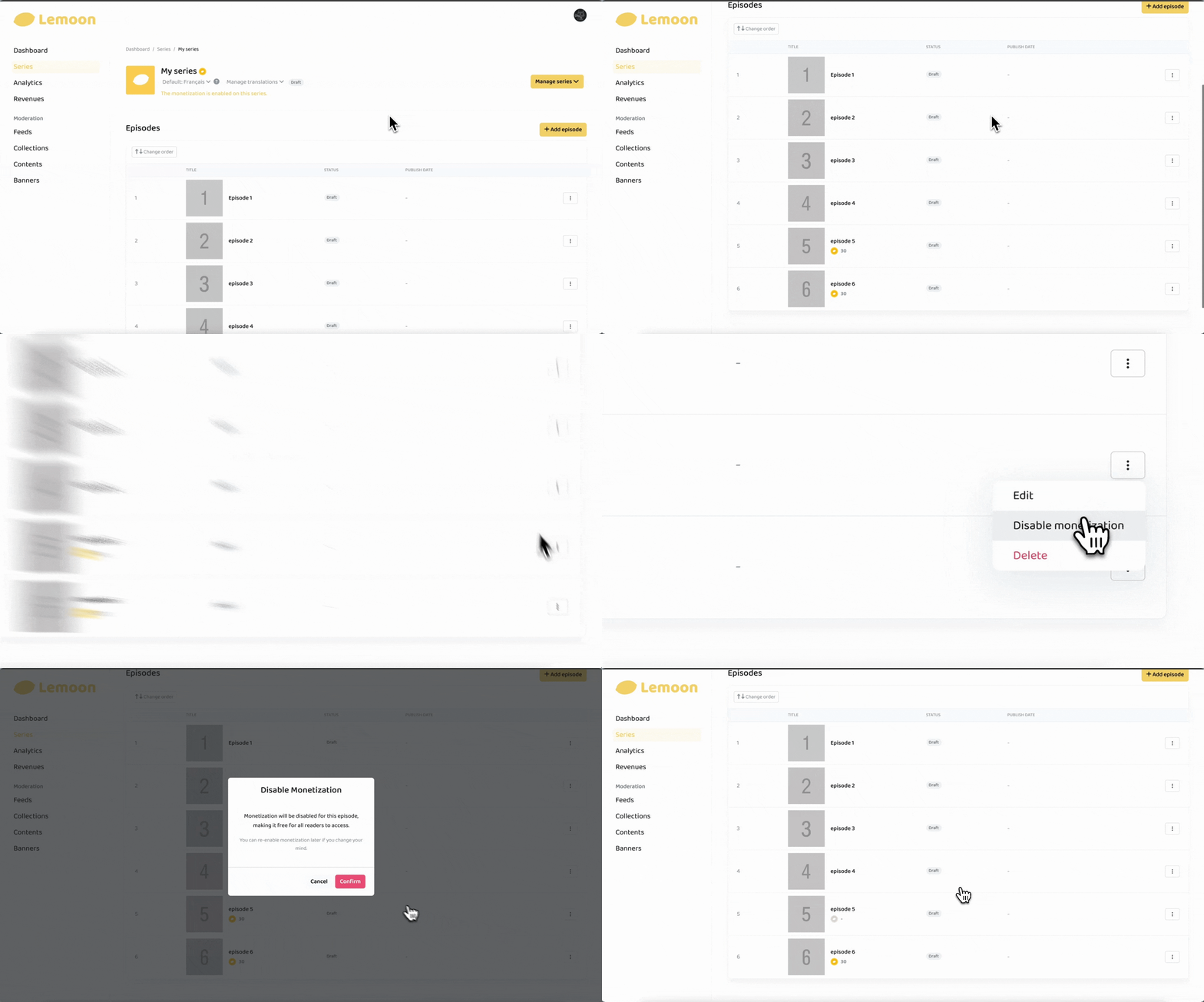
- Open your account menu on the LEMOON website and select Dashboard.
- Select Series.
- Find the series that contains the episode and select Manage.
- If the series has multiple language versions, choose the version that contains the episode.
- Find the paid episode and open its action menu at the right.
- Select Disable monetization.
- Select Confirm. A dash replaces the Coin amount.
If you cannot see Disable monetization
Make sure the following are true:
- Monetization is enabled for that language version.
- The episode is currently paid.
If a dash appears instead of a Coin amount, the episode is already free.
If the episode is still paid and Disable monetization is missing, contact LEMOON support.